
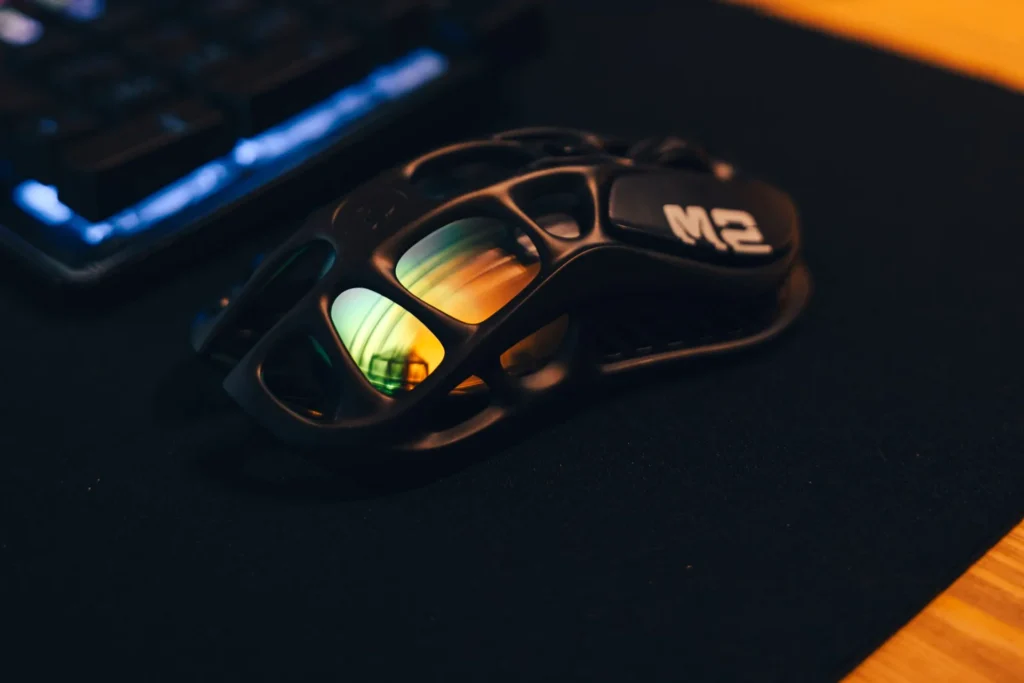
The ATTACK SHARK R5 TURBO is a 43-gram-class carbon fiber wireless mouse with a PixArt PAW3950MAX sensor, 8,000 Hz polling in both wired and wireless modes, and Omron switches — for roughly $90 at retail. The confirmed hardware is genuinely strong for clickers, but two things complicate the story: the official store now lists the weight as 45g, not 43g, and no independent review or teardown has yet confirmed the switches or the shell. This guide separates what is confirmed from what is still unproven, compares it against the R5 Ultra and the big-brand rivals, and answers the only question that matters for clickers: does it actually help you click faster?
Forty-three grams. Carbon fiber. Eight-thousand-hertz polling in both wired and wireless modes. A flagship sensor. And a price that starts well under a hundred dollars. The ATTACK SHARK R5 TURBO, announced on October 19, 2026 and available from October 23, reads like a spec sheet designed to make every other ultralight mouse look overpriced. So the question clickers should ask is not whether the specs look good — they do — but whether this mouse actually changes anything for clicking, and what is still unproven.
One month after launch, the picture has filled in a little. The official store now shows a real price, the weight figure has quietly moved, and a hands-on review of the sibling R5 Ultra has exposed exactly the kind of spec-accuracy problem buyers should watch for with this brand. None of that makes the Turbo a bad mouse. It makes it a mouse worth buying with open eyes — for the confirmed hardware, not for the marketing.
If you are still learning which mouse specs actually matter for clicking, our best mouse for CPS guide is the place to start — it explains why weight, switches, and debounce matter far more than a DPI number.
Design and Build: Carbon Fiber, Cutouts, and a Familiar Shape
The R5 Turbo’s shell is the first thing to understand, because it is both the reason the mouse is light and the reason it looks the way it does. ATTACK SHARK uses an injection-molded carbon fiber composite — carbon fiber mixed into a moldable composite, not woven carbon fiber sheets — formed into a hollowed-out, ventilated shell with triangular cutouts. The idea is familiar from other ultralight mice: remove material where it is not needed, keep structure where it is. Carbon fiber composite is a step up from the usual plastic at this weight, and the brand claims it gives the shell structural strength and wear resistance that plastic shells at the same weight cannot match.
The exterior has what ATTACK SHARK calls a glass-feel ice coating — a smooth, cool-touch finish intended to reduce the stickiness that sweaty hands cause during long sessions. The R5 Ultra review from TechXReviews, which tested the same shell family hands-on for a month, found the carbon fiber chassis “incredibly resilient” and able to withstand intense sessions without flex, but noted that the triangular cutouts on the right side can cause minor discomfort where the ring finger and pinky rest over multi-hour sessions — and that the grip tape included in the box resolves the issue immediately. That is a useful, honest data point for the Turbo too, since the two mice share the same shell dimensions.
The shape is symmetrical, right-handed, with a center-placed hump and a slight outward flare at the front, according to the EloShapes shape database, which lists the Turbo and the Ultra with identical dimensions. The sensor sits slightly forward of center (about 55% of the length). At 119.5 mm long, 61.0 mm wide, and 36.3 mm tall, this is a medium-sized mouse: it suits palm and claw grips for medium hands, and fingertip grip for larger hands. Small hands may find it a stretch for palm grip. The rear hump sits somewhat low, per the Ultra hands-on review — comfortable in the palm without forcing finger flex during rapid tracking, but worth a try-before-you-buy if you have strong preferences about hump height. Our mouse grip styles guide explains how palm, claw, and fingertip grips interact with a shape like this, and why the same mouse can feel completely different in two different hands.
There are no holes in the bottom of the mouse — the ventilation is in the shell sides — and the base carries PTFE feet, which is the standard low-friction material on good gaming mice. The scroll wheel uses TTC Golden Wheel encoders and has a custom electroplated finish; the Ultra review noted its scroll wheel sits lower than typical designs but offers highly tactile, incremental rotations. The mouse has the standard layout for this class: left and right primary buttons, two side thumb buttons, and a clickable scroll wheel — five buttons plus the wheel click.
The box includes the mouse, the 8K wireless receiver, a USB-C cable, grip tape, and a guide. The receiver deserves a mention because it is part of the Turbo’s identity: a shark-fin-inspired design with an extended antenna structure for signal strength and three LED indicators showing connection mode, polling rate, and battery level. It is bulkier than a typical nano receiver, but it is also the hardware that makes the 8,000 Hz wireless polling possible.
The mouse comes in three colors: black, white, and a new Dune colorway — a sand-inspired tan that ATTACK SHARK launched with the Turbo. Dune costs $5 more than black or white at MSRP ($94.99 vs $89.99).
Full Specifications
Every figure below comes from ATTACK SHARK’s own store page or its launch announcement, checked on November 23, 2026. Where sources disagree, the table says so — see the weight note underneath.
| Specification | ATTACK SHARK R5 TURBO |
|---|---|
| Weight | 45g ±3g (official store spec table); ~43g ±3g (launch announcement and press coverage) |
| Dimensions | 119.5 × 61.0 × 36.3 mm |
| Shell | Injection-molded carbon fiber composite, hollowed-out ventilated design |
| Surface | Glass-feel ice coating (cool-touch, sweat-resistant) |
| Sensor | PixArt PAW3950MAX |
| Max DPI | 60,000 (range 1,200–60,000, adjustable in 50-DPI steps) |
| Max tracking speed | 750 IPS |
| Max acceleration | 60G |
| Static scan rate | 20,000+ FPS |
| Lift-off distance | 3 levels: 0.7 / 1.0 / 2.0 mm |
| MCU | Nordic nRF54LM20 |
| Polling rate | Up to 8,000 Hz wired AND wireless |
| Click latency | As low as 0.168 ms (manufacturer internal testing) |
| Switches | Omron switches, rated 100 million clicks (press materials describe them as optical; see the switch note below) |
| Scroll wheel encoder | TTC Golden Wheel |
| Connectivity | Wired USB-C / 2.4 GHz wireless / Bluetooth 5.2 |
| Battery | 290 mAh |
| Battery life | Up to 300 hours at 1,000 Hz polling (controlled test conditions) |
| Mouse feet | PTFE |
| Colors | Black, White, Dune |
| In the box | Mouse, 8K receiver, USB-C cable, grip tape, guide |
| Announced | October 19, 2026 |
| Available from | October 23, 2026 |
The weight note. The launch announcement and every piece of press coverage — Notebookcheck, FunkyKit, TechBarrista, XiaomiToday — said approximately 43g ±3g. The official store’s spec table now says 45g ±3g, and its product page headline reads “45 ±3g Ultra-Lightweight”. The two figures overlap within the ±3g tolerance (43g is inside the 42–48g range of a 45±3g mouse), so neither is necessarily wrong — but the headline number has moved up 2g since launch, and that is exactly the kind of quiet revision worth noticing. For context, the R5 Ultra’s advertised 39g turned out to be 42–43g on a reviewer’s calibrated scale. The honest way to describe the Turbo’s weight: expect roughly 43–45g, and do not buy it on the strength of the 43g figure alone.
The switch note. Press materials describe the switches as Omron optical switches rated for over 100 million clicks. The official store’s product page, however, lists them simply as “Omron Microswitches (100 Million Clicks)” — the word “optical” does not appear in the store’s spec table. That distinction matters, because the R5 Ultra had exactly this problem: marketed as D2FP FN2 optical switches, torn down to reveal older Omron D2FC-F-7N mechanical switches. Until someone opens a retail Turbo and photographs the switches, treat “optical” as the press description, not a confirmed fact. The clicking section below explains why the distinction matters so much for clickers.
Sensor and Performance: What 60,000 DPI Actually Means
The PAW3950MAX is PixArt’s current flagship sensor, and on paper the Turbo’s implementation is the strongest in the R5 family: up to 60,000 DPI (against the Ultra’s 42,000), 750 IPS tracking speed, and 60G acceleration (against the Ultra’s 50G). The sensor supports DPI adjustment in 50-DPI steps from 1,200 up to 60,000, a static scan rate above 20,000 frames per second, and three lift-off distance settings at 0.7, 1.0, and 2.0 mm.
Here is the honest translation of those numbers for clickers. The 60,000 DPI figure is the headline, and it is also the least important number on the sheet. Nobody plays at 60,000 DPI — competitive players use roughly 400 to 1,600 DPI, and even high-sensitivity players rarely pass 3,200. What a high maximum DPI actually tells you is that the sensor is a current-generation flagship with plenty of headroom, not that you will ever use the top of its range. The numbers that matter in real play are the tracking speed (750 IPS means the sensor keeps tracking during fast flicks without spinning out) and the acceleration rating (60G means it keeps up during violent direction changes). Both are comfortably beyond what any human hand produces in a game. The lift-off distance settings matter more than the DPI ceiling: a low 0.7 mm setting means the sensor stops tracking almost the moment you lift the mouse, which is what you want when you reposition during fast clicking sessions.
The new Nordic nRF54LM20 microcontroller is the other half of the performance story. It replaces the previous generation’s nRF54L15 and is what enables the Turbo’s headline feature: 8,000 Hz polling in both wired and wireless modes. ATTACK SHARK’s internal testing claims wireless click latency as low as 0.168 ms. Treat that figure as a manufacturer claim, not an independent measurement — no reviewer has yet published a latency test on a retail unit. What the new MCU does change in a verifiable way is power efficiency: the same chip that enables 8K polling is also the reason the Turbo can claim 300 hours of battery life at 1,000 Hz, a figure the Ultra could not match.
One more performance detail worth knowing: the Turbo supports configuration through a web driver and downloadable software, with cloud-based configuration. The sibling R5 Ultra’s web driver — tested hands-on by TechXReviews — allows adjusting polling rate, DPI levels, debounce time, motion sync, and angle snapping. ATTACK SHARK has not confirmed the same debounce setting for the Turbo specifically, which matters for drag clicking (see below). If the Turbo’s software does include a debounce adjustment, that would be a meaningful clicking feature — but it is unconfirmed, so do not buy the mouse for it.
Battery and Connectivity: The 300-Hour Claim, Honestly
The Turbo carries a 290 mAh high-density battery, and ATTACK SHARK rates it for up to 300 hours at 1,000 Hz polling — measured under controlled test conditions, with the fine print that actual battery life varies with usage, settings, and environment. That is a strong headline figure, and it is worth understanding what it does and does not promise.
Three hundred hours at 1,000 Hz is the best-case number: low polling, presumably with the mouse’s power-saving behavior active. At 8,000 Hz wireless, the battery will last a small fraction of that — the radio has to wake up eight times as often, and the MCU works harder. How small a fraction is exactly what no one can tell you yet, because no independent reviewer has measured the Turbo’s real battery life at 8K. For comparison, Razer’s Viper V3 Pro — a 54g mouse with a similar 8K wireless feature — is rated at 95 hours at 1,000 Hz and about 17 hours at 8,000 Hz. The Turbo’s newer Nordic nRF54LM20 chip is more power-efficient than the generation before it, so a direct comparison would be guesswork. The practical advice: if you buy the Turbo, run it at 1,000 Hz for everyday play and switch to 8,000 Hz only for competitive sessions. You get nearly all of the battery life and nearly all of the responsiveness, and you are not charging the mouse every other day. Our polling rate and debounce guide explains what polling rate actually does to your click speed — and what it does not.
Connectivity is triple-mode: wired USB-C, 2.4 GHz wireless through the shark-fin 8K receiver, and Bluetooth 5.2. The dual-8K claim — 8,000 Hz in both wired and wireless modes — is a genuine upgrade over the R5 Ultra, whose wired connection was capped at 1,000 Hz. For clickers who play wired, that is one of the Turbo’s clearest improvements over its predecessor: you no longer give up polling rate by plugging in. Bluetooth is the third option, useful for laptops and casual use, but it runs at a much lower polling rate and is not the mode for competitive clicking.
Charging is via the USB-C cable in the box. There is no charging dock, and no wireless charging — at this price, that is expected, not a flaw.
What It Means for Clickers: Technique by Technique
For clicking specifically, the Turbo’s case rests on three things: the weight, the switches, and the shape. Polling rate is a bonus, not a CPS feature — 1,000 Hz is already far faster than any human clicking rate, and your fingers cannot click anywhere near 1,000 times per second. Where 8,000 Hz helps is cursor smoothness and slightly lower overall latency, mainly on high-refresh monitors with a strong CPU, and it costs extra CPU and battery. Buy this mouse for the weight and the switches; enjoy 8K as a garnish, not the meal.
Here is how each clicking technique maps onto this mouse, honestly.
Normal clicking
The Turbo is well suited to normal clicking. At roughly 43–45g, there is very little mass to move, which means less fatigue in long sessions and quicker finger repositioning between clicks. The symmetrical shape with a center hump works for palm and claw grips, and the light weight makes it easy to lift and reset — something that matters more than most buyers realize during long CPS sessions. If you are measuring your speed with a CPS click speed test, a lighter mouse will not magically raise your number, but it will let you hold your pace longer before your hand tires. That is the real benefit: endurance, not peak speed.
Jitter clicking
Jitter clicking — vibrating the arm to produce rapid clicks, usually 10–14 CPS — benefits from a light mouse, because the technique is tiring and every gram counts over a session. The Turbo’s weight is a genuine advantage here. The open question is the switches: jitter clicking rewards a crisp, consistent click with a short travel, and optical switches (if that is what the Turbo has) are structurally better for it than mechanical ones, because there is no contact bounce and no debounce delay. But until the switch type is confirmed by a teardown, treat the jitter advantage as “likely, not proven”. Read our jitter clicking guide before pushing the technique hard — it covers the safety rules, the warm-ups, and the stop signals that matter more than any mouse choice.
Butterfly clicking
Butterfly clicking — two fingers alternating on the same button, typically 12–20 CPS — is where the Turbo’s weight and (probable) optical switches should shine. Two-finger clicking means the button gets hit twice as often, so switch durability and consistency matter more than with any other technique, and a 100-million-click rating (if accurate) is reassuring. The symmetrical shape helps too: butterfly clicking works best when both fingers can sit comfortably on the left button, and a narrow, symmetrical mouse with a flat top gives them room. The glass-feel coating is a small plus here — sweaty fingers slip less during long butterfly sessions. Our butterfly clicking tutorial walks through finger placement, rhythm drills, and the mouse check that decides everything.
Drag clicking
Drag clicking is the one technique where you should not buy the Turbo on hope. Drag clicking needs a low, adjustable debounce setting — the mouse must register the many tiny clicks a dragging finger produces, instead of filtering them out as bounce. ATTACK SHARK has not advertised adjustable debounce for the Turbo. The sibling R5 Ultra’s web driver does include a debounce adjustment, according to TechXReviews’ hands-on test, but that is the Ultra’s software, not a confirmed Turbo feature, and the two mice use different MCUs. Until someone confirms the Turbo’s software has a debounce control — or a reviewer actually drag-clicks a retail unit and reports the result — treat drag clicking on this mouse as unproven. If drag clicking is your main technique, the honest alternatives are mice with confirmed adjustable debounce: the Glorious Model O 2 Wireless has a debounce setting in its software, and the Bloody A70 is built around adjustable debounce (16 ms down to 4 ms) at around €41 on Alza — though no US price was available at the time of writing. Our drag clicking guide explains the hardware, the technique, and the server rules to check first.
Shape is the unknown you cannot judge from a spec sheet
Weight and switches are numbers; shape is personal. A 43g mouse that does not fit your grip is worse than a 60g mouse that does. The Turbo’s medium length (119.5 mm) and low rear hump will suit most medium hands in palm or claw, but fingertip players with large hands may find it short, and small hands may find it a stretch. If you can try one in a store or buy from a retailer with easy returns, do that before committing — ATTACK SHARK’s own store offers a 15-day no-reason return and exchange policy, which is enough time to judge fit. If you already own a good ultralight mouse you like, the Turbo’s upgrades are real but incremental, and shape fit beats every spec on the sheet.
R5 Turbo vs R5 Ultra: The Upgrade Is Not What You Think
The Turbo is the successor to the R5 Ultra, and the comparison is more interesting — and more honest — than the marketing suggests. The Turbo is not simply a lighter, better Ultra. In one important respect it is worse.
| R5 TURBO | R5 ULTRA | |
|---|---|---|
| Weight | 45g ±3g (store) / ~43g (announcement) | 39g ±3g claimed; 42–43g measured by TechXReviews |
| Sensor | PixArt PAW3950MAX, up to 60,000 DPI | PixArt PAW3950MAX, up to 42,000 DPI |
| Tracking speed / acceleration | 750 IPS / 60G | 750 IPS / 50G |
| MCU | Nordic nRF54LM20 | Nordic 52840 |
| Polling rate | Up to 8,000 Hz wired AND wireless | Up to 8,000 Hz wireless; wired capped at 1,000 Hz |
| Click latency | As low as 0.168 ms (internal testing) | Not published |
| Switches | Omron, 100M clicks (described as optical in press; store page says “microswitches”) | Omron D2FC-F-7N mechanical 100M found in teardown (marketed as D2FP FN2 optical) |
| Scroll wheel encoder | TTC Golden Wheel | F-Switch E10 |
| Battery | 290 mAh, up to 300 h at 1,000 Hz | Not published in the sources checked |
| Bluetooth | 5.2 | 5.2 (Ultra review tested 5.1; store lists 5.2) |
| Dimensions | 119.5 × 61.0 × 36.3 mm | 119.5 × 61.0 × 36.3 mm (identical) |
| Colors | Black, White, Dune | Black, White |
| Official store price (Nov 23, 2026) | MSRP $89.99 ($94.99 Dune); Dune on sale $80.74 | MSRP $85.99; on sale $68.79 |
Three things stand out. First, the Turbo is heavier than the Ultra — or at least, it is advertised heavier. The Ultra claims 39g; the Turbo claims 43–45g. Even allowing for the Ultra’s real-world weight (42–43g on a scale), the Turbo is not the lighter mouse. If you are upgrading from an Ultra specifically for weight, you are going the wrong way.
Second, the Turbo’s real upgrades are the MCU, the wired 8K polling, the sensor ceiling, and the switches. The nRF54LM20 enables 8,000 Hz over a cable — the Ultra capped wired at 1,000 Hz — and the sensor’s maximum DPI rises from 42,000 to 60,000 with acceleration from 50G to 60G. Those are genuine improvements, though the DPI ceiling is the least important of them. The switch change is the most important for clickers if it is real: the Ultra’s teardown found mechanical switches where optical were advertised, while the Turbo is described as optical in press materials. But given that history, the switch claim is exactly what needs independent confirmation.
Third, the Turbo costs more. At MSRP the Turbo is $89.99 against the Ultra’s $85.99, and on the official store right now the Ultra is on sale at $68.79 while the Turbo’s Dune is $80.74. If you already own an Ultra, the Turbo is a sidegrade with a new MCU, not a must-buy upgrade. If you own neither, the Turbo is the better buy for the wired 8K and the (probable) optical switches — but the Ultra at $68.79 is the better value if your budget is tight and you mostly play wireless.
R5 Turbo vs the Rivals
The Turbo does not compete in a vacuum. Here is how it stacks up against the three mice a clicker would most realistically cross-shop it with — prices checked November 23, 2026.
| ATTACK SHARK R5 Turbo | Razer Viper V3 Pro | Logitech G Pro X Superlight 2 | Glorious Model O 2 Wireless | |
|---|---|---|---|---|
| Weight | ~43–45g | 54g (55g white) | 60g | 68g |
| Sensor | PixArt PAW3950MAX, 60,000 DPI | Razer Focus Pro 35K Gen-2, 35,000 DPI | Logitech HERO 2, 44,000 DPI | Glorious BAMF 2.0, 26,000 DPI |
| Tracking | 750 IPS / 60G | 750 IPS / 70G | 500+ IPS / 40G+ (HERO 2 class) | 650 IPS |
| Polling | 8,000 Hz wired + wireless | 8,000 Hz wireless; 1,000 Hz wired | 8,000 Hz wireless (with LIGHTSPEED); 1,000 Hz wired | 1,000 Hz max |
| Switches | Omron, 100M (optical per press) | Razer Gen-3 optical, 90M | LIGHTFORCE hybrid optical-mechanical | Glorious switches, 80M |
| Battery (1,000 Hz) | Up to 300 h claimed | 95 h (17 h at 8,000 Hz) | 95 h | 110 h (2.4 GHz, RGB off); 210 h Bluetooth |
| Bluetooth | Yes, 5.2 | No | Yes | Yes, 5.2 LE |
| Debounce adjustment | Not confirmed | Via Razer Synapse | Via G Hub | Yes, in Glorious Core software |
| List price | $89.99 ($94.99 Dune) | $159.99 | $159.99 | $99.99 |
| Street price (Nov 2026) | $80.74 (Dune sale, official store) | Often $110–130 on sale | Often ~$145–155 on sale | ~$75 on sale |
The table tells the Turbo’s story in one glance: it is the lightest mouse here by roughly 10g, and the cheapest by roughly $70–80 at list price — while matching or beating the big brands on sensor, polling, and battery claims. That is the value proposition, and it is real. The trade-offs are equally clear: Razer and Logitech offer proven switch hardware, mature software, established warranty support, and years of independent testing. The Turbo offers better numbers on paper and a brand whose spec sheets have been wrong before. For a clicker on a budget, the Turbo is the most interesting mouse in this table. For a clicker who wants zero doubt about what is inside the shell, the Viper V3 Pro remains the safer buy — it is 54g, its Gen-3 optical switches are confirmed by dozens of teardowns, and its 8K wireless polling is independently verified. The Superlight 2 is the established all-rounder at 60g with the best software ecosystem of the group. The Model O 2 Wireless is a proven choice specifically for drag clicking, with a confirmed adjustable debounce setting in its software — which makes it, despite being the heaviest at 68g, the most proven drag-clicking pick in this table.
For a wider sense of what the 2026 flagship market looks like, our Corsair Sabre v3 Pro review covers another new flagship with a very different approach — a 37g ultralight with per-direction sensitivity tuning — and shows how much choice clickers have at the top end this year.
Price and Value
Prices checked November 23, 2026, from ATTACK SHARK’s official store:
- MSRP: $89.99 for black and white, $94.99 for Dune.
- Current sale: Dune listed at $80.74 (15% off its $94.99 MSRP) on the official store.
- VIP pre-order: from $64.99, based on a $1 deposit that returns a discount code — the cheapest route if you caught it.
- R5 Ultra for comparison: MSRP $85.99, currently on sale at $68.79 on the same store.
No Amazon US price for the Turbo could be confirmed in this check — the launch announcement said the mouse would be available through ATTACK SHARK’s Amazon storefronts in the US, UK, Europe, Australia, Mexico, Saudi Arabia, and Japan from October 23, but no live US Amazon listing with a price surfaced in search on November 23. Check the listing before ordering, and treat any price in this article as a listing price to verify, not a permanent one. Regional pricing varies, and launch-window offers change fast.
Is it good value? At roughly $81–90, the Turbo undercuts every big-brand ultralight by $70 or more while offering a lighter shell, a flagship sensor, dual 8K polling, and a much longer claimed battery life. That is a strong value proposition on paper. The honest caveat is the same one that runs through this whole guide: the value depends on the hardware being what the spec sheet says it is, and the brand’s record on that point is mixed. If the switches are optical and the weight is 43–45g, the Turbo is the best-value clicking mouse of the year. If a teardown finds mechanical switches again, it is still a good mouse — but the value story weakens, and the R5 Ultra at $68.79 becomes the better buy from the same brand.
The Trust Question: Attack Shark’s Spec Record
This section is uncomfortable, and it is also the most useful part of this guide — because it is the part no announcement-based coverage includes.
The R5 Ultra is the Turbo’s direct predecessor, from the same brand, with the same shell family and the same marketing style. A hands-on review by TechXReviews, after a month of testing, found three discrepancies: the switches marketed as D2FP FN2 optical were actually older Omron D2FC-F-7N mechanical switches; the sensor’s published figures contradicted each other across the brand’s own pages (50G and 650 IPS in one place, different numbers elsewhere); and the advertised 39g weight measured 42–43g on a calibrated scale. The reviewer also noted that the community had flagged the switch error in an official Discord announcement as early as February 2025, and months later the storefront still showed the incorrect optical branding. The reviewer’s verdict on the Ultra itself was positive — the physical hardware performed flawlessly, the shell was resilient, the clicks were crisp — but the marketing inaccuracies were, in his words, “a severe blemish on the company’s integrity”.
That history does not prove anything about the Turbo. It does set the standard of proof. When the same brand launches a successor with the same style of claims, the careful buyer checks rather than trusts — and the Turbo already has one small item on that list: the weight figure moved from 43g in the announcement to 45g on the store. Within tolerance, yes, but in the same direction as the Ultra’s real-world weight drift.
None of this is a reason to dismiss the mouse. The Ultra’s reviewer liked the actual hardware enough to recommend it despite the marketing problems, and the Turbo’s confirmed hardware — the sensor, the MCU, the battery, the dual 8K polling — is genuinely strong. It is a reason to buy the Turbo for what is confirmed and verifiable, to wait for one teardown before treating the “optical switches” claim as fact, and to buy from a retailer with an easy return policy. ATTACK SHARK’s own store offers a 15-day no-reason return and exchange policy, which is enough time to judge the shell, the clicks, and the fit for yourself.
What Is Still Unproven
As of November 23, 2026 — a month after launch — the Turbo’s unproven list is short but important:
- Independent reviews. No reviewer has yet published hands-on testing of a retail unit’s click feel, switch consistency, shell quality, or long-term comfort. All coverage so far is announcement-based. The 0.168 ms latency claim is internal testing only.
- The switch type. Press materials say Omron optical; the store page says “Omron Microswitches” without the word optical. Given the Ultra’s history, a teardown is the only confirmation that counts.
- Real battery life at 8K. The 300-hour figure is at 1,000 Hz under controlled conditions. At 8,000 Hz wireless, expect a small fraction of that — reviewers will measure the real number.
- Debounce adjustment. The Ultra’s web driver has one; the Turbo’s has not been confirmed to. This decides whether the mouse is usable for drag clicking.
- Shell durability. Carbon fiber composite sounds premium, but the hollowed-out design and the cool-touch coating need months of sweaty-handed use before anyone can say whether they hold up. The Ultra’s month-long test was encouraging on this point.
- Final street pricing. With the VIP pre-order, the MSRP, the store sale, and Amazon listings all in play, the price you actually pay depends on when and where you buy. Wait for the price to settle if you are not in a hurry.
Should Clickers Buy It?
A practical verdict:
- Buy it if you want one of the lightest wireless mice available with (probably) optical switches, and the current listing price — around $81–90 — fits your budget. On paper, it is one of the strongest value propositions in ultralight mice right now, and it is lighter than every big-brand rival by a clear margin.
- Buy the R5 Ultra instead if your budget is tight and you mostly play wireless. At $68.79 on the official store, it is the same shell, the same sensor family, the same 8K wireless polling — and its compromises (mechanical switches, wired capped at 1,000 Hz) are known rather than guessed.
- Wait for a teardown if you are buying mainly for drag clicking, or because the “optical switches” claim is the deciding factor. One teardown answers both questions, and it should arrive soon.
- Wait for reviews if you are buying for battery life at 8K, or because you expect 8K polling to raise your CPS — neither is established, and 8K will not raise your CPS anyway.
- Skip it if you already own a good ultralight mouse you like. The Turbo’s upgrades over a solid 50–60 g mouse are real but incremental, and shape fit beats every spec on the sheet.
The R5 Turbo is not magic. It is a very light, very well-specified mouse at an aggressive price, from a brand building its reputation on value — and from a brand whose spec sheets have been wrong before. For clickers, the weight and the (probable) optical switches are the reasons to care. Everything else is context. Wait for one teardown to confirm the switches, and this could be the best-value clicking mouse of the year. If you want to build your speed while you wait, our how to click faster guide compares every technique side by side, and our how to improve click speed guide covers the fundamentals that matter more than any mouse.
Frequently Asked Questions
How much does the ATTACK SHARK R5 TURBO weigh?
The launch announcement said approximately 43g ±3g, but ATTACK SHARK’s official store spec table now lists 45g ±3g. The two figures overlap within the ±3g tolerance, so expect roughly 43–45g in practice — and do not buy it on the strength of the 43g figure alone.
How much does the ATTACK SHARK R5 TURBO cost?
MSRP is $89.99 for black and white, $94.99 for Dune. As of November 23, 2026, the official store lists Dune on sale at $80.74, and a VIP pre-order route started from $64.99 with a $1 deposit. No Amazon US price could be confirmed in this check — verify the current listing before ordering.
When was the ATTACK SHARK R5 TURBO released?
Announced on October 19, 2026, and available from October 23, 2026 through ATTACK SHARK’s Amazon storefronts in the US, UK, Europe, Australia, Mexico, Saudi Arabia, and Japan. Pre-orders opened October 23 PDT, with shipping from November 7.
Does 8000 Hz polling increase CPS?
No. For clicking speed, 1,000 Hz is already far faster than any human clicking rate. 8,000 Hz polling helps cursor smoothness and overall latency, mainly on high-refresh monitors, and it costs extra CPU and battery. Buy the mouse for its weight and switches, not for polling alone.
Is the R5 TURBO good for drag clicking?
Unproven. Its switches are described as Omron optical in press materials, which would suit rapid clicking, but ATTACK SHARK has not advertised adjustable debounce, which drag clicking needs, and the switch type itself has not been confirmed by a teardown. The sibling R5 Ultra’s web driver does include a debounce setting, but that is not a confirmed Turbo feature. Wait for hands-on testing before buying it for that technique.
Should I buy the R5 TURBO or the R5 Ultra?
Buy the Turbo if you want dual 8K polling (wired and wireless), the newer Nordic nRF54LM20 chip, the higher 60,000 DPI ceiling, and the probable optical switches. Buy the Ultra if your budget is tight — at $68.79 on the official store it is the same shell and sensor family with 8K wireless, and its compromises are known rather than guessed. The Turbo is not lighter than the Ultra, so do not upgrade for weight.
The bottom line: the R5 Turbo is a very light, very well-specified mouse at an aggressive price, and its weight and switches — if the switches are what the press materials say — make it one of the most interesting clicking mice of the year. But it comes from a brand whose last mouse shipped with different switches than advertised and weighed more than claimed, and its own store has already moved the weight figure from 43g to 45g. Buy it for the confirmed hardware, buy it from somewhere with easy returns, and wait for one teardown before treating the marketing as fact. The mouse is probably excellent. The spec sheet is not yet proven.